
Digital Prodcuts
Notary Public Digital Marketing Bundles

Beautiful abstract marketing bundle featuring the pantone color of the year 2022, Very Peri.
This beautiful bundle includes:
printable business card
digital business card
thank you card
8 x 10 flyer
4 x 6 flyer
I.D. badge
You will receive an email with download links.

Digital Marketing Bundle - Gold Feather and Black
Introducing our exclusive digital marketing bundle tailored specifically for notary public professionals. This comprehensive package combines essential marketing materials with a touch of elegance, featuring a white background adorned with a gold feather and sleek black accents.
This Marketing Bundle includes:
printable business cards
digital business card
I.D. Badge
Thank you card
8 x 10 Marketing Flyer
4 x 6 Marketing Flyer

This beautifully designed Marketing Bundle contains the following:
Printable Business Card
Digital Business Card
I.D. Badge
8 x 10 Marketing Flyer
4 x 6 Marketing Flyer
Thank You Card
Once your purchase is complete you will receive an email with the downloadable link.
Thank you.

Digital Marketing Bundle - Black, Brown, White and Beige
Digital Marketing Bundle in Black, Brown, White and Beige. This bundle contains the following:
Printable business cards
Digital business cards
I.D. Badge
8 x 10 Marketing Flyer
4 x 6 Marketing Flyer
Thank you cards

Digital Marketing Bundle - Blue and Floral
This beautifully designed Digital Marketing Bundle Contains the following:
printable business card
digital business card
8 x 10 Flyer
4 x 6 Flyer
Thank You Card
I.D. Badge
Upon purchase you will receive an email with a link to download your purchase.
Thank you!

Make it stand out
Canva Website Templates
CANVA WEBSITE TEMPLATES
Did you know that Canva entered the world of Website builder sites this past year. You can now launch a fully customizable professional free one page website within minutes on Canva.com. No design experience is needed.
We at Notary Know How know the importance of an online presence and marketing your notary business and that is why we have custom designed website templates specifically for Notary Publics.
Below are some of our designs to choose from. Each design is made for Canva. You just need a free or paid Canva account to use the template on their website. To create a one-page website for free with Canva, users will either need to connect a custom domain (e.g., yoursite.com) or use a free Canva domain (e.g., yoursite.canva.com). If using a custom domain, you will have to purchase a paid Canva plan.
Since we did all the design work for you, all you have to do is go to the template link, edit with your contact information and photo and publish your site. That's it! Simple, huh?
Notary Public Website Templates

Notary Public Website Template #1 - Black and White Professional
NOTARY PUBLIC WEBSITE TEMPLATE #3
***LIVE DEMO LINK***
https://dhsmobilenotary.my.canva.site/notary-public-website-template-1
✔ Introducing a professional Canva Notary Public Website Template – the perfect solution for Notary Publics seeking to grown their online presence and market their notary business.
✔ Canva offers an intuitive drag-and-drop website editor suitable for beginners and experienced website owners. Enjoy the affordability and flexibility to manage and update your website without the need for an expensive web design service.
✨10 Pages included:
✔ Home (hero header)
✔ About me
✔ My services summary
✔ Services in detail, one page per service (6 total)
✔ Contact (Footer)
✔ Easily tailor your website by changing texts, changing images, adding, duplicating or removing pages and sections to match your specific needs.
✔ You will need a free or paid Canva account to be able to access the notary public website template.
✔ How It Works:
1️⃣ Purchase this template.
2️⃣ Download PDF file that contains access link to the template and any tutorials or instructions.
3️⃣ Create or log in to your Canva account.
4️⃣ Open the template in Canva and customize it to your liking. You can effortlessly edit text, replace images, and adjust colors to reflect your unique style.
5️⃣ Publish the website on a Canva domain (free) or on your own domain (premium).
🚨 Important Information:
To remove Canva branding, connect your own domain (e.g., www.yourdomain.com), and unlock advanced features, consider upgrading your Canva account.
Please note that this template is exclusively designed for Canva and is not compatible with other website platforms such as WordPress or Squarespace.
📜 License:
Redistribution of this template or any derivative is strictly prohibited. For every new site you build using this template, you will need to buy a new copy of the template from Notary Know How.
Facing an issue or looking for additional customization? Feel free to message me and I will be there to support you.
Copyright @notaryknowhowllc

Notary Public Website Template #3 - Red / Black / White - Modern
NOTARY PUBLIC WEBSITE TEMPLATE #3
***LIVE DEMO LINK***
https://dhsmobilenotary.my.canva.site/notary-website-template-3
✔ Introducing a professional Canva Notary Public Website Template – the perfect solution for Notary Publics seeking to grown their online presence and market their notary business.
✔ Canva offers an intuitive drag-and-drop website editor suitable for beginners and experienced website owners. Enjoy the affordability and flexibility to manage and update your website without the need for an expensive web design service.
✨10 Pages included:
✔ Home (hero header)
✔ About me
✔ My services summary
✔ Services in detail, one page per service (6 total)
✔ Contact (Footer)
✔ Easily tailor your website by changing texts, changing images, adding, duplicating or removing pages and sections to match your specific needs.
✔ You will need a free or paid Canva account to be able to access the notary public website template.
✔ How It Works:
1️⃣ Purchase this template.
2️⃣ Download PDF file that contains access link to the template and any tutorials or instructions.
3️⃣ Create or log in to your Canva account.
4️⃣ Open the template in Canva and customize it to your liking. You can effortlessly edit text, replace images, and adjust colors to reflect your unique style.
5️⃣ Publish the website on a Canva domain (free) or on your own domain (premium).
🚨 Important Information:
To remove Canva branding, connect your own domain (e.g., www.yourdomain.com), and unlock advanced features, consider upgrading your Canva account.
Please note that this template is exclusively designed for Canva and is not compatible with other website platforms such as WordPress or Squarespace.
📜 License:
Redistribution of this template or any derivative is strictly prohibited. For every new site you build using this template, you will need to buy a new copy of the template from Notary Know How.
Facing an issue or looking for additional customization? Feel free to message me and I will be there to support you.
Copyright @notaryknowhowllc
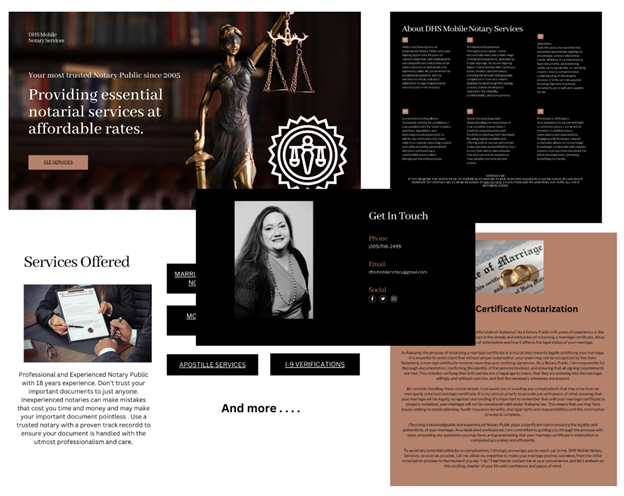
Notary Public Website Template #2 - Dark Academia aesthetic
***LIVE DEMO LINK***
✔ Introducing a professional Canva Notary Public Website Template – the perfect solution for Notary Publics seeking to grown their online presence and market their notary business.
✔ Canva offers an intuitive drag-and-drop website editor suitable for beginners and experienced website owners. Enjoy the affordability and flexibility to manage and update your website without the need for an expensive web design service.
✨10 Pages included:
✔ Home (hero header)
✔ About me
✔ My services summary
✔ Services in detail, one page per service (6 total)
✔ Contact (Footer)
✔ Easily tailor your website by changing texts, changing images, adding, duplicating or removing pages and sections to match your specific needs.
✔ You will need a free or paid Canva account to be able to access the notary public website template.
✔ How It Works:
1️⃣ Purchase this template.
2️⃣ Download PDF file that contains access link to the template and any tutorials or instructions.
3️⃣ Create or log in to your Canva account.
4️⃣ Open the template in Canva and customize it to your liking. You can effortlessly edit text, replace images, and adjust colors to reflect your unique style.
5️⃣ Publish the website on a Canva domain (free) or on your own domain (premium).
🚨 Important Information:
To remove Canva branding, connect your own domain (e.g., www.yourdomain.com), and unlock advanced features, consider upgrading your Canva account.
Please note that this template is exclusively designed for Canva and is not compatible with other website platforms such as WordPress or Squarespace.
📜 License:
Redistribution of this template or any derivative is strictly prohibited. For every new site you build using this template, you will need to buy a new copy of the template from Notary Know How.
Facing an issue or looking for additional customization? Feel free to message me and I will be there to support you.
Copyright @notaryknowhowllc

Notary Public Website Template #4
NOTARY PUBLIC WEBSITE TEMPLATE #4
***LIVE DEMO LINK***
https://dhsmobilenotary.my.canva.site/notary-public-website-template-4
✔ Introducing a professional Canva Notary Public Website Template – the perfect solution for Notary Publics seeking to grow their online presence and market their notary business.
✔ Canva offers an intuitive drag-and-drop website editor suitable for beginners and experienced website owners. Enjoy the affordability and flexibility to manage and update your website without the need for an expensive web design service.
***10 Pages included:
✔ Home (hero header)
✔ About me
✔ My services summary
✔ Services in detail, one page per service (6 total)
✔ Contact (Footer)
✔ Easily tailor your website by changing texts, changing images, adding, duplicating or removing pages and sections to match your specific needs.
✔ You will need a free or paid Canva account to be able to access the notary public website template.
✔ How It Works:
1 Purchase this template.
2 Download PDF file that contains access link to the template and any tutorials or instructions.
3 Create or log in to your Canva account.
4 Open the template in Canva and customize it to your liking. You can effortlessly edit text, replace images, and adjust colors to reflect your unique style.
5 Publish the website on a Canva domain (free) or on your own domain (premium).
*** Important Information:
To remove Canva branding, connect your own domain (e.g., www.yourdomain.com), and unlock advanced features, consider upgrading your Canva account.
Please note that this template is exclusively designed for Canva and is not compatible with other website platforms such as WordPress or Squarespace.
*** License:
Redistribution of this template or any derivative is strictly prohibited. For every new site you build using this template, you will need to buy a new copy of the template from Etsy.
Facing an issue or looking for additional customization? Feel free to message me and I will be there to support you.
Copyright @notaryknowhowllc